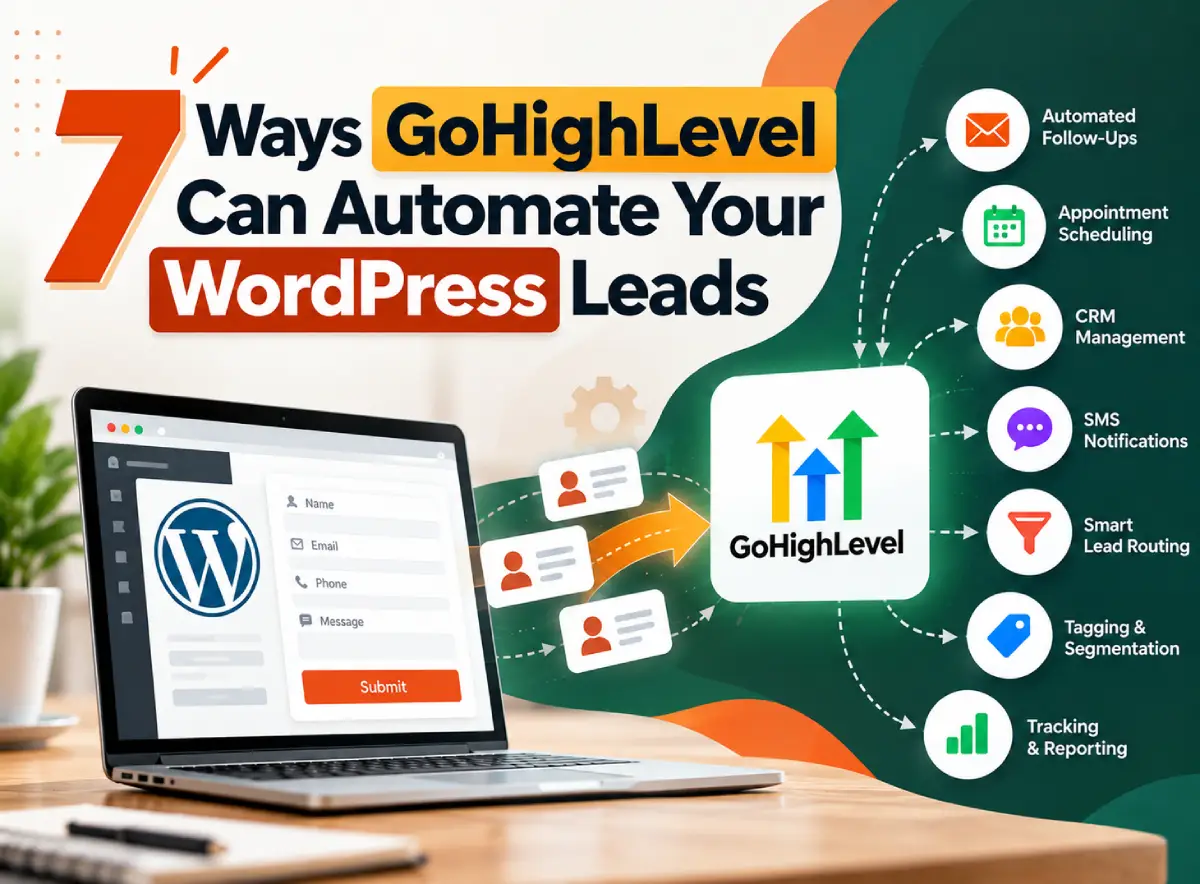

When you integrate GoHighLevel WordPress automation for your WordPress, your workflow eliminates hours of work by automatically getting your leads collected through contact forms, subscriptions, etc.
Therefore, as WordPress can attract the audience and capture their information, GoHighLevel WordPress integration manages contacts, automates follow-ups, and tracks leads through the sales process when the systems are properly connected.
In this guide, I will explain 7 different ways you can use GoHighLevel to automate your WordPress leads.
Automatically Capture WordPress Form Submissions
Leads that come from contact forms, quote requests, consultation forms, and landing pages can enter GoHighLevel automatically with WordPress lead automation by connecting through webhooks, or automation connector.
For example, when a visitor requests a quote through a WordPress form. Their details are added to GoHighLevel. In that way, the business can begin its follow-up process.
It reduces the workflow of someone to manually transfer the information, as every enquiry can enter a central lead management system.
Send Instant Responses to New Leads
When you automate your workflow with GHL, you can send an immediate email acknowledging the enquiry. When messaging requirements are met, you can also send an automated SMS after appropriate consent is met.
When someone requests a consultation on a WordPress website. They receive an acknowledgement and a link to schedule a suitable time. At the same time, the GoHighLevel lead automation can also set up the expectations while the team prepares a personal response.
Build Automated Lead Nurturing Sequences
Every lead does not come guaranteeedly to turn into a client. Some visitors need more information, time to compare options, or a better understanding of your services before making a decision.
With a GoHighLevel WordPress integration, you can create email sequences based on the original enquiry. These emails can share educational resources, explain your services, highlight relevant case studies, and guide prospects toward the next step.
You can also use workflow conditions to personalize communication based on a lead’s interests, actions, or contact details. For example, if someone downloads a service guide from your WordPress website but does not book a consultation, they could receive helpful resources followed by an invitation to schedule a discovery call.
Qualify Leads and Segment Contacts Automatically
Not all WordPress leads have the same needs or buying intentions. Sending identical messages to every contact can make your follow-ups less relevant. GoHighLevel lead automation helps you organize contacts into meaningful groups and direct them toward the appropriate next step.
You can use form responses, tags, and custom fields to categorize leads by service interest, enquiry type, business requirements, or other information collected through your website. Configured workflows can then route contacts into relevant follow-up sequences or notify the appropriate team members.
The effectiveness of this approach depends on the information your forms collect and the workflow rules you configure with GoHighLevel WordPress Integrations.
Automate Appointment Booking and Reminders
When a potential customer is ready to discuss your services, scheduling a meeting should be straightforward. However, manually coordinating availability, sending confirmations, and reminding prospects about appointments can create unnecessary work.
With GoHighLevel calendars and workflows configured alongside your WordPress lead capture process, you can automate several steps in the booking journey.
Track Leads Through an Automated Sales Pipeline
If you cannot see whether an enquiry has been contacted, an appointment has been booked, or a proposal has been sent, opportunities can easily slip through the cracks.
GoHighLevel CRM provides pipeline tools that help businesses organize and monitor leads throughout the sales process. When connected to your WordPress lead generation system, configured workflows can create opportunities from incoming inquiries, assign leads to team members, and trigger actions when specific conditions are met.
Some updates require manual actions, workflow configuration, or additional integration logic, depending on your setup.
You will get a clearer view of your sales pipeline, identify outstanding follow-ups, and reduce the chances of promising leads being forgotten.
Re-engage Leads Who Stop Responding
Some prospects submit a form on your WordPress website but never reply to your first email. Others express interest in your services but postpone booking a consultation.
Instead of relying on your team to remember every inactive contact, you can use GoHighLevel workflows to support consistent follow-ups.
If someone requests a quote but does not respond to your initial email, an automated reminder could check whether they still need assistance. Configure the workflow to stop or adjust when the prospect replies, books an appointment, or opts out of further communication.
FAQs
Can GoHighLevel integrate with WordPress?
Yes. GoHighLevel can connect with WordPress through compatible integrations, form connectors, webhooks, or other supported methods to transfer lead information and trigger workflows.
Can GoHighLevel automatically follow up with WordPress leads?
Yes. Configured workflows can send automated emails and, where permitted, SMS messages after a lead submits a form or meets specific conditions.
Can I connect WordPress forms to GoHighLevel?
Yes. Depending on your form plugin, you can use a direct integration, compatible connector, or webhook to send form submissions to GoHighLevel.
Can GoHighLevel qualify and organize WordPress leads automatically?
Yes. Workflows can apply tags, update custom fields, segment contacts, and route leads based on form responses and configured conditions.
Do I need technical skills to automate WordPress leads with GoHighLevel?
Not necessarily. Many basic workflows can be configured without coding, but custom integrations, complex workflows, or troubleshooting may require technical assistance.
Turn your WordPress Leads into Opportunities!
Your WordPress website can generate inquiries, but what happens after a visitor submits a form determines how effectively you manage those opportunities. With GoHighLevel lead automation, you can connect lead capture with personalized follow-ups, appointment reminders, contact segmentation, and sales pipeline management.
The right setup helps reduce manual work, maintain consistent communication, and give your team more time to focus on converting qualified prospects.
Ready to automate your WordPress leads? iB SOFTS provides GoHighLevel WordPress integration solutions to connect your forms, configure workflows, and build a lead management process that works for your business.