
AI can give you an answer in seconds. But what happens when the task requires more than an answer?
A real business task might involve many procedures, from researching to checking data, updating sheets and applications, tracking documents, and preparing a final report. Chatbots like ChatGPT and Gemini can generate answers in seconds that are all individual steps. But humans still need to be the ones to connect each step.
Is it possible to make AI connect the entire procedure?
The Cloudflare OS agent workspace fits into this broader shift by giving us a useful way to think about what AI looks like when it has an environment in which to actually work.
In this blog, you will learn what happens when an AI agent gets an environment where it can access the resources and tools needed to actually do the work.
Table of Contents
| 1 | Why Chatbots Are Not Enough For Real Work |
| 2 | What Is Cloudflare OS AI Agent Workspace? |
| 3 | How AI Agents Actually Get The Work Done |
| 4 | What Can Agent Workspaces Be Used For? |
| 5 | Why Agent Workspaces Matter For Businesses |
Why Chatbots Are Not Enough For Real Work
Imagine you give a prompt to an AI agent, something like;
“Research our competitors, review these three documents, summarize the findings, and prepare a report.”
With the required documents, sheets, etc.
The AI chatbot can answer the questions you ask regarding the work, personalize it, read the documents and sheets, summarize for easy readability, and prepare a report based on your requirement.
But there is an important difference between generating the individual outputs and orchestrating the entire workflow.
Even after giving your chatbot the documents and prompt, you may still need to find the relevant documents, upload them, open different applications, search for information, copy information between tools, decide which step comes next, format the final report, and complete other actions.
The architectural difference is that a chatbot primarily operates around a prompt-and-response interaction, while an AI agent can operate around a goal and a sequence of actions. The agent needs access to the context, tools, applications, and information required to move from one step to the next.
What Is Cloudflare OS AI Agent Workspace?
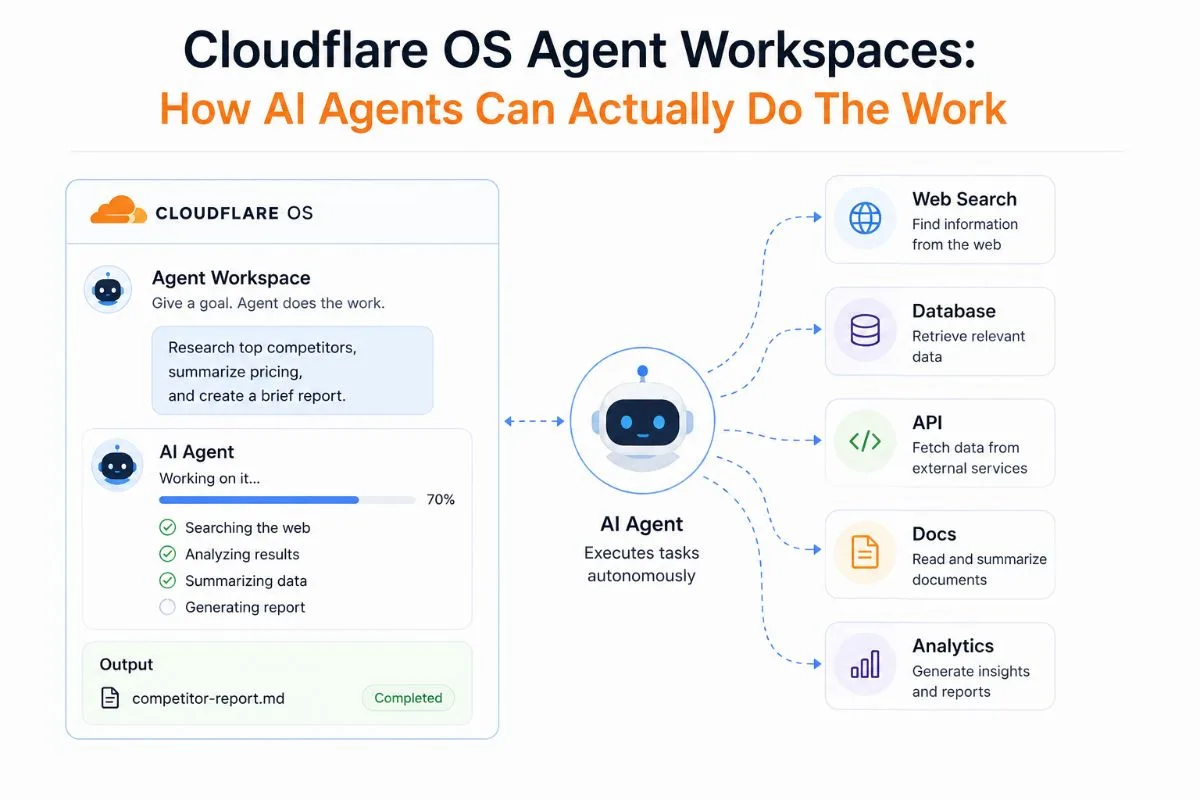
Cloudflare OS AI agent workspace is an environment provided by Cloudflare where an AI agent can operate tasks with the context, resources, and tools that it needs to do the work, beyond just reposting to a prompt like a chatbot.
The workspace not only contains different resources but also helps show how those resources work together around the agent’s task.
- Context and information: Gives the agent the background and relevant information it needs to understand the task.
- Documents: Lets the agent work with files and documents as part of the task rather than treating them as isolated inputs.
- Tools: Enables the agent to use specific capabilities required to complete an action.
- Applications: Allows the agent to work with software and business applications involved in the workflow.
- APIs: Provides a way for the agent to interact with external services and systems programmatically.
- Tasks and workflows: Connects individual actions into a larger process, allowing the agent to work toward an outcome.
This creates a relationship between the components rather than treating them as separate features:
Goal → Context → Relevant resources → Tools and applications → Actions → Result
So, we see the distinction clear that a chatbot primarily gives you information in response to a prompt. But an agent workspace gives an AI agent the environment and resources needed to use information, interact with tools, and complete a task.
How AI Agents Actually Get The Work Done
Now that we have learned what an AI agent workspace is, it is time to see how these AI agents can actually do the work in the workspaces specifically created for them.
The value of an agent workspace becomes clearer when you look at the kind of work an AI agent can perform within it. Instead of limiting AI to conversations, these workspaces can support tasks that involve information, tools, and multiple steps.
Research
Agents can gather information from relevant sources, organize findings, and produce a useful summary without requiring the user to coordinate every research step.
Document Work
Agents can read, compare, summarize, and extract information from multiple documents, helping reduce manual document review.
Knowledge Work
Agents can connect information from different sources and use that context to answer questions, identify patterns, or support decisions.
Application Workflows
Instead of simply explaining which buttons to click, agents can potentially interact with connected applications and perform actions within a workflow.
Multi-Step Processes
Agents can coordinate several related actions toward one objective—for example, gathering information, analyzing it, updating a document, and preparing the final output.
Reporting
Once the work is complete, agents can organize the results into summaries, reports, recommendations, or other useful outputs.
In short, we need to move AI from simply telling users what to do to helping them actually get the work done.
The framework should look like this:
User gives a goal → Agent understands the task → Accesses relevant information → Uses tools → Takes actions → Produces the result
What Can Agent Workspaces Be Used For?
The easiest way to understand agent workspaces is to look at the workflows they can support. Here are some workflows with practical examples where the AI agents can use these workspaces to perform the task.
1. Research And Analysis
For a research-related workflow, the AI agent workspace can be effectively optimized. Here, an agent can gather information from relevant sources, analyze what it finds, and organize the key findings into a structured output.
Example workflow:
Research goal → Gather relevant information → Analyze sources → Compare findings → Identify key insights → Prepare summary
2. Document Intelligence
In this kind of workflow, you can turn multiple documents and turn them into useful insights in just some minutes, as an agent can work across documents to extract information, compare content, summarize findings, or organize important details.
Example workflow:
Documents → Extract information → Compare content → Identify differences → Summarize findings → Create output
3. Cross-Application Business Workflows
One of the most useful ways to use the Cloudflare OS workspace is to complete tasks across multiple connected systems. Inside of the workspace, you don’t need to juggle between multiple apps, documents, and information to perform a task. The AI agent is capable of doing the task entirely inside the workspace.
Instead of simply telling a user what to do, an agent can potentially retrieve information, interact with applications, and coordinate several actions.
Example workflow:
Customer request → Retrieve CRM information → Check support history → Verify account details → Update application → Generate confirmation
4. Reporting And Deliverables
With the reporting workflow, the AI agents can turn completed work into deliverables that you can use for your business work. After completing research, analysis, or other tasks, an agent can organize the results into a report, summary, recommendation, or other output.
Example workflow:
Collect data → Analyze results → Identify key insights → Structure findings → Produce report
Why Agent Workspaces Matter For Businesses
There are several benefits to using the Cloudflare OS agent workspace for your business. Whether you are a small organization just starting out or a huge MNC speeding up the repetitive process, agent workspace holds huge impacts for positive outcomes.
When you utilize your business workflow with an agentic workspace, you need less human to coordinate with tasks. The AI agent, once it has access to the required tools and data, can perform multiple tasks on its own within the workspace.
As AI can automate the repetitive tasks, it creates more time for businesses to work on other tasks that need deep human eyes and research.
- When you utilize your business workflow with an agentic workspace, you need less human to coordinate with tasks. The AI agent, once it has access to the required tools and data, can perform multiple tasks on its own within the workspace.
- As AI can automate the repetitive tasks, it creates more time for businesses to work on other tasks that need deep human eyes and research.
- Agents can coordinate multiple actions in sequence, reducing the time and manual effort required to complete complex tasks.
- Agents can connect information across documents, systems, and applications, making business knowledge easier to use within workflows.
- Last but not least, agents can handle repeatable workflows at scale, allowing businesses to support more tasks without increasing manual effort at the same rate
FAQs
What is a Cloudflare OS agent workspace?
A Cloudflare OS agent workspace is an environment where an AI agent can work with relevant context, documents, tools, applications, and APIs to complete tasks rather than simply respond to prompts.
How is an AI agent workspace different from a chatbot?
A chatbot primarily generates responses based on user prompts. An agent workspace is designed to give an AI agent access to the resources and tools it needs to work through multi-step tasks.
What can AI agents do in a workspace?
Depending on the available tools and permissions, agents can support research, document analysis, knowledge work, application workflows, multi-step processes, and reporting.
How can agent workspaces help businesses?
They can reduce manual coordination, speed up multi-step workflows, connect information across systems, and help businesses scale repeatable AI-assisted operations.
Do AI agent workspaces replace human workers?
Not necessarily. Their primary value is reducing repetitive coordination and execution. Human oversight and judgment can still be important, particularly for sensitive or high-impact decisions.
Are AI agent workspaces secure?
Security depends on how the workspace, tools, permissions, authentication, and connected systems are configured. Agents should only receive the access necessary for the tasks they are expected to perform.
Wrapping It Up
AI is moving beyond the chatbot model, where users ask questions and manually carry out the next steps. Agent workspaces represent a shift toward AI that can access information, use tools, interact with applications, and coordinate multiple actions toward a defined outcome.
Cloudflare OS agent workspaces fit into this shift by providing an environment for agents to work with the resources and tools required to perform tasks. For businesses, this could mean faster workflows, better use of business information, and more scalable AI-assisted operations.
The goal isn’t to remove humans from every workflow. It is to reduce the repetitive coordination that keeps people busy moving information between systems so they can focus on decisions and work that requires human judgment.
Ready to Move From AI Answers to AI Actions?
AI becomes significantly more valuable when it can work with your business information, tools, and workflows instead of simply generating another response. Explore how agent-ready architecture can help your website and business systems become more accessible to AI agents.