
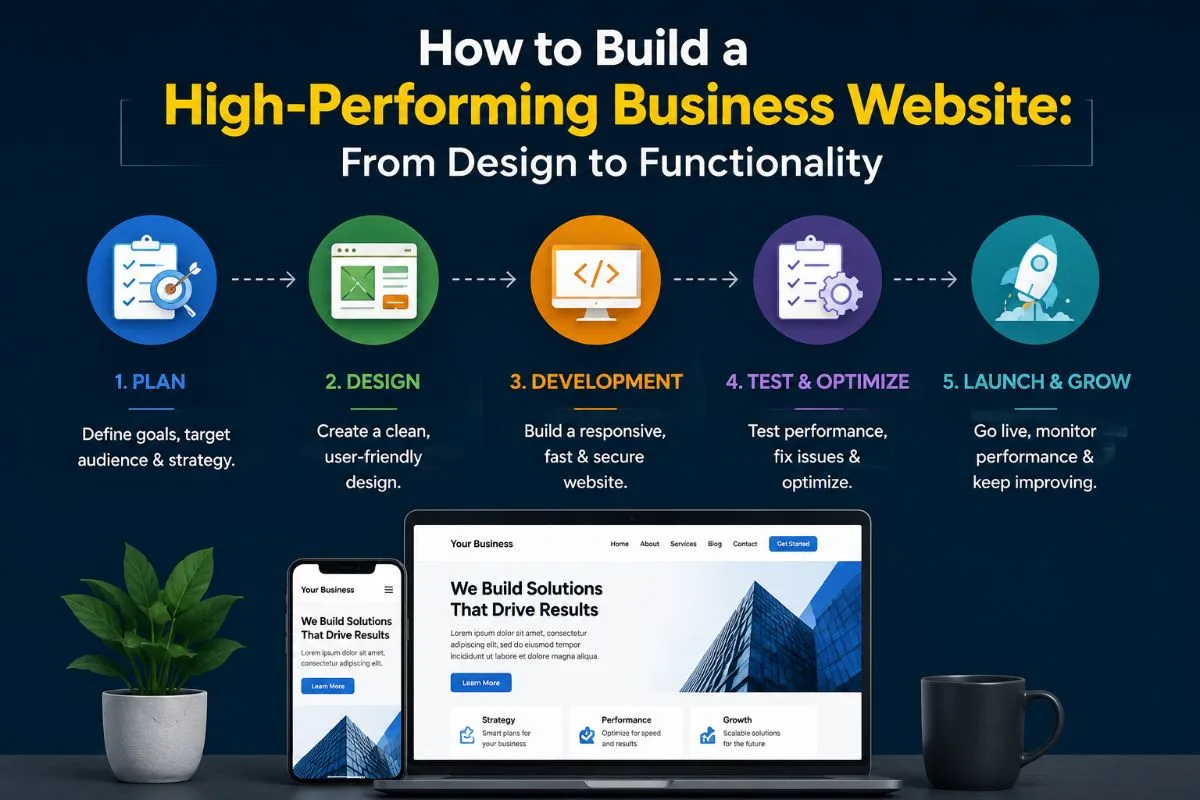

A good-looking website is not necessarily a good-performing website.
You read it right. Your website may have a fancy layout, aesthetic designs, graphics, and fonts. Let me expose something real: the modern design of your website can lose customers if your loading speed is as fast as a snail.
If your website ignores technical aspects that go behind to make it function properly, it is going to cause your website trouble. Technical aspects mean creating a digital experience that is fast, easy to use, search-friendly, secure, functional, and built around clear business goals.
A high-performing business website brings design, functionality, performance, SEO friendliness, and security all together to make it appeal to the visitors in every aspect. Both can co-exist together, but not in isolation.
This guide explains how to build one from the ground up and what businesses should consider before, during, and after development.
Table of Contents
| 1 | Why Many Business Websites Underperform |
| 2 | What Makes A Business Website High-Performing |
| 3 | Start With Strategic Business Planning |
| 4 | Build Around User Experience and Designs |
| 5 | Prioritize Responsive Web Design |
| 6 | Optimize Website Performance |
| 7 | Build an SEO-Friendly Website |
| 8 | Add the Right Website Functionality |
| 9 | Use WordPress And Plugins Strategically |
| 10 | Know When Custom Functionality Is Required |
| 11 | Build Custom Functionality When You Need |
| 12 | Design the Website for Conversions |
| 13 | Build Security Into the Website |
| 14 | Make the Website AccessibleMake the Website Accessible |
| 15 | Measure What Your Website Is Doing |
| 16 | Build for Future Growth |
| 17 | Follow a Structured Development Process |
| 18 | How to Choose a Website Development Company |
| 19 | High-Performing Business Website Checklist |
| 20 | FAQs |
| 21 | Build a Website That Works for Your Business |
Why Many Business Websites Underperform
The signs may not be obvious. A business works days or even weeks to make a website visually appealing, as that seems to be the fundamental stage to grab the attention of people.
But a professional business website can still underperform if,
- It has a slow loading time
- It does not generate leads
- It has poor performance on mobile
- There’s a difficulty to navigate
- It is invisible in searches.
- Has poor conversion paths
- Becomes difficult to maintain
- Relies on too many plugins
- Can’t support new business requirements
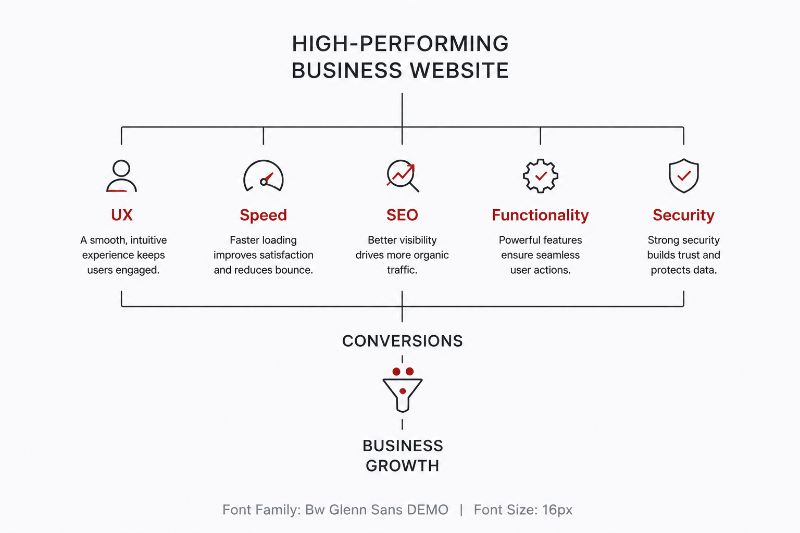
See? When I mentioned website performance in the introduction, it did not just limit to page loading speed. It is broader because a high-performing website works across several dimensions.
Here’s a diagram for you to understand the basics in less than a minute:
What Makes A Business Website High-Performing
Think about what is the goal of your business website. Grow your business among customers, right? Then why not learn what goes into making one?
A website that performs highly usually doesn’t just look good with designs but also helps users find information quickly, works consistently across devices, loads efficiently, is discoverable by search engines, supports business-specific functions, encourages visitors to take action, and protects user and business data; is accessible to different users; provides measurable performance data; and adapts as the business grows and so on.
Therefore, building these capabilities requires more than just choosing templates. It all starts with planning.
Start With Strategic Business Planning
Planning establishes structure, what should be done, what the process is going to be, what the business goal is, who the target audiences are, etc.
Ask your business first what it wants to achieve: leads or sales or visibility or book appointments or build, provide customer support, etc. Are you sure what actions you want your website to take? Have you planned your content to serve the goals?
Preparing a strategic plan for your business website should serve a smooth implementation of the next processes rather than choosing the layout. Here’s an easy roadmap:
Business goal → Audience → User journey → Content → Functionality → Technology
Build Around User Experience and Designs
Website design goes beyond making a website beautiful, attractive, and eye-catching. It should also be easy to navigate and operate with a strong call-to-action.
Use the visual hierarchy to highlight critical information, use navigation to help customers find their way around the site and return to the previous page or the homepage, and use typography and spacing to make the site scannable. CTAs should also be compelling, such as “Get a quote” and “Schedule a consultation.”
Websites should also have consistent designs throughout the website, using the same layout, fonts, colors, and messaging. Trust signals such as reviews, testimonials, and logos also build trust among customers.
Prioritize Responsive Web Design
Your website shouldn’t only work well on a desktop. Responsive web design ensures that the experience adapts smoothly to phones, tablets, and many other different screen sizes.
By responsive design, I also include that navigation should remain easy to use, buttons should be comfortable to tap, text should stay readable, and images should scale without breaking the layout. Forms and other important interactions should also work smoothly on smaller screens.
A website that works well across devices provides a more consistent user experience and reduces friction. If mobile visitors struggle to navigate or complete an action, you could be losing potential conversions, even if your desktop website looks excellent.
Optimize Website Performance
Does your website take 5 seconds to load? An average of 1 second page delay can reduce the rate of conversion by 7% and page views by 11%
So, start by optimizing large images, reducing unnecessary scripts, enabling caching, and minimizing unused code. It’s also useful to monitor Core Web Vitals to understand how users experience your website.
Build an SEO-Friendly Website
SEO should be considered during website development rather than afterwards. The initial step in developing an SEO-friendly website is to ensure that it has the correct structure, URLs, titles, headings, and internal links.
In other words, the website is easily understandable by search engines so that they can follow links, index pages, and ultimately rank them higher on the search engine results pages (SERPs). This is achieved by using an XML sitemap to assist search engines in comprehending the website’s structure.
Image alt tags, metadata, canonicalization, and structured data are also crucial in SEO. It is important to note that SEO-friendly websites are easy to navigate for humans, rank well in search results, and gain credibility from customers.
Add the Right Website Functionality
Depending on your business, this could include contact forms, appointment booking, calculators, search, customer portals, payment systems, CRM integrations, email automation, or product catalogs.
But don’t add functionality simply because a feature is available. Every feature should solve a genuine business or user need. For example, a simple contact form may only need a standard solution, while a complex customer portal may require custom development.
Your job is to build a website with the right functionality to support your customers and business processes, not one with too many features.
Use WordPress And Plugins Strategically
If you do not know coding and are worried about applying developing principles for your website, your worry has a solution.
WordPress provides your business with a flexible foundation for managing content, publishing pages, and adding new functionality with plugins. It can extend that functionality with features such as forms, SEO tools, e-commerce, analytics, and integrations.
But you should not overlook the fact that more plugins don’t necessarily mean a better website. Too many or poorly maintained plugins can affect performance, security, and compatibility. Make sure that you choose plugins based on actual business requirements, maintenance, and how well they fit into the overall website architecture.
Know When Custom Functionality Is Required
Plugins are useful for common website requirements, but they aren’t the answer to every problem. If your business needs a specialized workflow, customer portal, advanced integration, custom calculator, or unique user experience, an off-the-shelf solution may not be enough.
Custom development makes sense when existing tools create limitations or cannot support the required functionality.
Build Custom Functionality When You Need
Custom web development can be utilized to accomplish a variety of objectives, such as managing business processes, creating unique user experiences, and incorporating essential components that are not available through existing solutions.
With custom development, a website can be built around the specific requirements of the business rather than adjusting the business processes to fit within the constraints of an existing solution. It enables greater flexibility in terms of design, functionality, and scalability, ultimately supporting the long-term growth and sustainability of the website.
Design the Website for Conversions
A website can attract plenty of visitors and still generate few business results. That’s why every important page should guide visitors toward a clear next step.
So, use clear value propositions, visible CTAs, simple forms, relevant landing pages, and trust signals such as reviews or testimonials while removing unnecessary steps between a visitor and the action you want them to take.
The conversion journey may look like:
Traffic → Information → Trust → Action → Conversion
Build Security Into the Website
The worst mistake you can ever do for your business website is compromising its security. Consider it right from development, not after launch. Use HTTPS, secure authentication, strong access controls, regular backups, and timely updates for your CMS, themes, and plugins.
It is critical to take the time to ensure that the website is protected, especially since most website security issues originate from CMS, themes, or plugins that are not updated. Keeping WordPress, themes, and plugins up to date can significantly enhance website security and performance, particularly for WordPress users.
Make the Website Accessible
A high-performing website should be usable by as many people as possible. Follow basic accessibility practices such as readable text, sufficient contrast, keyboard navigation, descriptive links, meaningful alt text, properly labeled forms, and logical heading structures.
Accessibility not only benefits individuals with disabilities but also improves the overall user experience by ensuring that the website is easy to navigate and operate.
Measure What Your Website Is Doing
You can’t improve what you don’t measure. Understanding how a website performs is essential in ascertaining what works and what needs improvement.
The tools can indicate where a visitor comes from, what they do after arriving at the website, where they go next, and the most visited or least visited pages.
Track meaningful outcomes such as:
- Form submissions
- Calls
- Bookings
- Purchases
- Downloads
- Conversion rates
Build for Future Growth
Your website should support where your business is going, not just where it is today. Scalable website development uses maintainable architecture, flexible content structures, suitable hosting, and integrations that can accommodate future growth.
Thus, it is critical to think beyond the present and into the future when developing the website. It is necessary to consider what the business will achieve in the coming years and how the website can support it.
In other words, developing the website should be done with future-proof technologies, hosting, and content management systems. Future-ready websites allow for the addition of new pages and features without requiring extensive redevelopment.
Follow a Structured Development Process -h2
A reliable business website development process typically includes:
- Discovery: Define business goals, audience, and requirements.
- Planning: Establish sitemap, content, functionality, and technology.
- Design: Create UX/UI and responsive layouts.
- Development: Build the website and required integrations.
- Testing: Check functionality, performance, SEO, security, and responsiveness.
- Launch: Deploy the website and configure analytics.
- Optimization: Monitor results and improve continuously.
How to Choose a Website Development Company
Don’t choose a development partner based only on portfolio visuals or price. Look for a company that understands your business goals as well as the technology required to achieve them.
Evaluate their:
- Development expertise
- UX and design capabilities
- SEO knowledge
- Performance practices
- Security approach
- Scalability experience
- Post-launch support
The right website development company should build for your current requirements while keeping future growth in mind.
High-Performing Business Website Checklist
Don’t know if your website is high-performing? Here is a simple checklist for you to turn your business website into one with high-performing functionality.
- Business goals and target audience defined
- Clear website structure and navigation
- Responsive web design
- Fast-loading pages
- SEO-friendly architecture
- Required functionality identified
- Plugins selected strategically
- Security and backups configured
- Accessibility considered
- Analytics and conversion tracking enabled
- Scalable architecture planned
- Testing completed before launch
FAQs
What makes a business website high-performing?
A high-performing business website combines good UX, responsive design, strong performance, SEO, useful functionality, security, accessibility, analytics, and scalability.
Is WordPress good for business websites?
Yes. WordPress provides a flexible platform for many business websites and can be extended through carefully selected plugins and custom development.
When should I choose custom web development?
Consider custom development when existing themes, plugins, or standard solutions cannot support your specific business requirements.
How can agent workspaces help businesses?
They can reduce manual coordination, speed up multi-step workflows, connect information across systems, and help businesses scale repeatable AI-assisted operations.
How can I improve website performance?
Start with image optimization, caching, efficient code, reliable hosting, fewer unnecessary scripts, and regular performance monitoring.
How often should a business website be updated?
Websites should be continuously maintained through software updates, security checks, content improvements, performance monitoring, and ongoing optimization.
Build a Website That Works for Your Business
Your website should do more than look professional. It should provide a smooth user experience, support your business processes, generate conversions, and remain ready for future growth. Whether you’re building a new WordPress website or need custom functionality, the right development strategy can make that possible